Friday, 9 November 2012

Google And Bing Play With Mirrors

Just when I was spending some of my free time on Facebook, I discovered about another cool easter by Google. And after doing some more research, I found the same about Bing too!

And this time, its not made by Google, but some other site. What is the easter? You would have guessed by the title, right?

Google Mirror - elgooG

This easter site was created by a company named 'All Too Flat'. And its a really old one actually but it was worth sharing. On this site, as the title suggests, you see all the text in a mirror style view, i.e. flipped horizontally.

Visit elgoog.im and check yourself.
Google Mirror Easter

I have also seen that there is one problem with the site and that is, when you enter any term to search, it returns an error that the doc has moved. So you can't access the result page full of flipped text. But anyways, you can get an idea from the homepage about what it really meant.

And not only that but at the bottom of the page, I found links to some other Google Easters like- Underwater Google, Gravity Google, Guitar and many more. Just visit the site and check it out!

Bing Mirror - gniB

The same thing here. Visit gnib.org and look for yourself. And this time, the search function also works properly. So you can type a term to search and you'll find that the whole SERP (Search Engine Result Page) has mirror like flipped text.

Bing Mirror Easter

This is what I got when I searched for 'Bing'. Are you able to understand anything? Open the full sized image, then maybe you would get something more clear.

There are still lots of cool mysteries to unfold and there are many interesting secrets hidden in this hugh online world what we call Internet. What do you think about these easters about Google and Bing? Do comment and let me know...

Thursday, 8 November 2012

Google PR Update Nov 2012 - Blogging Panorama is Now PR2

Google Page Rank Gift

Finally after taking away many nights of sleep from excited bloggers, Google has updated their Page Ranks! Like every other blogger, I was also excited for this month's PR update and the main reason for this excitement was this blog.

Blogging Panorama was started two months ago in September '12 and since then, this PR update of November 2012 is the first PR update and so I was excited to know the results of my two month's hard work.

And the results are very good  indeed - Blogging Panorama got PR2 and I think it is good enough for a 2 month old blog created from scratch. My other tech blog- Genious PC retains its old PR3. So I am happy with the performance of both my blogs now.

I know that PR2 is not something to boast about but I am happy with my blog's two months progress.

One should note that Page Rank is not the only means of grading a site, because even a low PR site can also have good traffic and sometimes very good quality blogs get low PR. And then there is the Alexa Rank also. But even if they possess very less importance and are inaccurate methods to grade a site, advertisers generally look for a site's Page Rank and Alexa Rank before making a deal. So it is very important indeed.

One cool fact that I found about these updated page ranks - Google itself has PR9 whereas Twitter has PR10!

How I got a PR2 in just 2 months?

Actually getting PR2 in two months is not a very difficult task. And it would be a very common thing if a regularly updated site gets a page rank of 2. Because getting to page rank 1 or 2 is very simple. But moving in the graph further is difficult. I mean to say that getting a page rank of 4 from 3 or 5 from 4 is very difficult.

In my future post, I will discuss what steps I took that I think would have resulted into this short victory. So stay connected with us.

And now about some secret...

Also let me declare something about a secret.... Um.. Its secret for now...But I can tell you what it is about.

Its about a giveaway for my blog subscribers and active blog commentors. I would be giving something for free to all those people who are actively following my blog. Not just to 1 or 2 but to at least 10 people.

Stay subscribed so that you don't miss the official announcement about the real secret...

What's your new PR?

Hope you all got good response from Google's PR update this time. I would love to hear your thoughts about this latest PR update of November 2012 and how it turned up for you. Do comment and share your new page ranks with us! 

You can also post an extra link to your blog's home-page so that our readers can get to your blog. And your blog will also be featured in the 'High PR Blog List' which is coming up shortly at this blog...

Wednesday, 7 November 2012

Make Your Blog Post Go 'Gangnam Style'

Viral Blogging

First let me clear your doubts.. I am not going to teach you some dance moves here! And that is obvious. Even I don't know how to dance. But I know some tricks about blogging. And that is what I am going to share with you.

OK. Let's move on to the real topic - Making a Viral Blog Post. 

So what actually is viral? 
The best example of going viral is 'Gangnam Style'. Going viral means gaining such a huge exposure and popularity that you can't even imagine.

What are the benefit of going viral? 
Ummm... There are tons of benefits like traffic explosion, popularity, exposure to the blogosphere and many more. Take the example of the South Korean rapper Psy. He got his name known to the world just because his Gangnam Style went viral. And if you are not a well known blogger, then going viral can also help create a name for yourself in this world. 

The list of benefits is too long. Just think over it...

How do things go viral?
Sometimes some of the most common things go viral. Sometimes the most unusual things go viral. It's about luck and some tricks. I believe that there are very less chances that if your blog post has the best content then it would go viral only due to that content. I think that that way your blog post can become very famous and can receive good response but content is not enough to make a blog post go viral.

I believe that a blog post (or anything else) can go viral if it has completely unique features and something that the world has never seen before. And then you require God's blessings in your favor to turn some roads for you. (What do you think? Does Gangnam Style have the best dance moves ever???)

I have always been experimenting with my blog and my blog posts. Different writing styles and posting times, everything affects the popularity of a blog post.

And I have come to some conclusions about going viral. What are they? Read on...

How to Make Your Blog Post Go Viral

Pro Tip- Imagine you are a reader yourself. This way you can decide yourself what can make your post viral. Right from looking at the title to the ending quotes, think what can make you go viral.

Magnetic Headline Titles

The title of the blog post is the first thing what a reader reads and decides the importance and uniqueness of the content without even reading it. So try to make an attractive and you can say Magnetic title.

Example- Why did you click on the title of this blog post you are reading now? Consciously or subconsciously your mind, after reading the title, decided that it has something interesting in it. Right?

readership magnet
Source: achievedstrategies.com
That is the key to it. Suppose your article is about SEO tips. Now consider these two titles - 'Best SEO Tips' and '10 Killer SEO Tips and Tricks'. Which title would you click on? Obviously the second one. Because it creates a feeling of excitement and it would be more appealing to your subconscious mind.

Using Attractive and IRrelevant Photos in Post

"A picture speaks more than a thousand words" - People of the world
"A picture speaks directly with subconscious mind" - Mahaveer Verma
Pictures are the most important element of your blog post after the content itself. And actually photos are a part of your content. And photos not only add important information to the article, but also they add more feelings into the article. 

Pictures in a blog post need not to be relevant always unless you are writing a tutorial. You can also use pictures to decorate your blog post and to encourage more feelings in your reader's minds. Take this article as an example. The photo of the Gangnam dance in the starting of this article is not related to the content but it creates a different feeling and a good impression in the minds of readers.

If you are writing about 'blogging challenges', then feel free to use a dog's photo who is jumping across a obstacle. These type of semi-off-topic pictures tend to higher readership for your blog posts. Also if the blog post you are writing is too long, then add some other photos here and there between the contents so that it entertains your readers and they don't run away.

This is just to create a feeling of casualness. The more casual and fantastic your blog post is, the more viral it may go.

Trending Topics

Sometimes writing about the most recent trending topics can do the trick. Once at my tech blog, I posted a trick to unblock some sites and in those days, many sites were blocked by the ISPs. And what kind of response did I get? I got 1000 pageviews for that post on the very first day! But this didn't remain too long. For few days I got nearly 500-700 pageviews daily for that post and then day by day the viral post went cold. But it is still one of the most viewed blog post on daily basis.

So writing about the trending topics did a trick to me. But the success of such trend based post can't be predicted. But yes, it does work very nice and you have a lot of chance to go viral.

The Funny Attitude

Humor is almost compulsory if you want to make a book or a blog post go viral. Because people love friendly, casual and funny things and you know - Nobody likes reading a dictionary!

Whenever you write a blog post, add some sense of casualness like you are sitting in front of them and talking to them. Also don't be over serious in your posts. If your article is full of humor and casual attitude, then more people will tend to read the complete article.

And remember - A funny man makes 100 friends while a serious one would get only another serious one!

Blog Posting Schedule

After discussing all the writing style stuff, let's move to some 'God's favor' things. There are some unusual tricks that can make a blog post go viral.

viral in social media
Image credit: jannoon028/Freedigitalphotos.net
One of them is the time when you publish your post i.e. the time of the day when your blog post goes live. You should set such a time for publishing your posts when most of your readers are online and reading your blog. The evening or early morning is a good time because at those hours people have some spare time to read blog posts. And they won't be able to neglect your magnetic headline :)

According to my experiments, I'll say - never publish in the afternoon. Because at that time most of the people are busy at office or colleagues and other work places. So there is a chance that your blog post may get buried there. 

But after all, your blog post would be still available at the top place at your blog's recent list. So it is not that necessary and it can't completely ruin your work. The more important scheduling is the scheduling of your post sharing time. Why? Read ahead.

Post Sharing Schedule

You have written a high quality article and now, you are going to promote it on the social networking sites. There are hundreds of people constantly sharing updates and photos on these social sites, so you won't like if your share doesn't get noticed.

First let me tell what not to do. This will help you in understanding what to do. Don't share your posts in the afternoon especially on Facebook. Because very few people will notice your share in the afternoon and by the evening, when most of the people get online, your share would get buried very deep by the newer updates and shares. So a waste of sharing your high quality article?

Always share your content when most people would notice it i.e. when most of your fans and followers or even friends are online. And if the time favors you, then you can go viral!

Newsletter Delivery Schedule

Same trick here. Set your email newsletter to deliver when most of your readers have spare time. For newsletter, early morning is the best time. Even than evening. Because people tend to check their emails early morning with a fresh mood and they would be sure to read your article.

If you send the same newsletter in the evening, then there are somewhat less chance that people will care about like they would do in the morning. Generally people tend to give evenings to friends and family so they tend to be more active on social networking sites in the evening.

Its all about finding out the best time for your blog post.

Over to you...

As you read, I didn't mention the importance of 'content' anywhere. Why? Because you have already read it a hundred times that 'Content is the King'. And even though it is... It is not enough to make something go viral.

In short, you make your blog post go viral by - attractive writing style and the best timings for publishing and sharing/promoting your post.

What do you think about going viral? Do comment and let me know. And if you think my article was nice, why not share it? Who knows maybe this post can go viral!

Monday, 5 November 2012

Basic Blogging Guide For Beginners

Blogging Tips for Beginners

Starting a blog of your own is very easy, but continuing with the blog to achieve new heights is a different thing. As a hobby you can write a few posts and a hundred people will read your blog daily. That is easy. But if you are really passionate about blogging and want a successful blog, then remember: 'It is not that easy.' 

I said not that easy but I would never say very hard. Why? Because if you are really interested in blogging and can afford to give hours to your new blog, then for you, this can be very easy too! From my experience, I can say that my first blog took good enough time to establish as a successful one, but because I was working hard on it from the very first day, I was able to get at good height of success. 

And I am still working to achieve more. This is the first step towards a successful blog- Always work smart in a positive direction. And never sit idle after achieving something. Target for more and one day you will surely get more. 

If you are thinking of making your own blog, then here is some basic stuff you should read well before leaping into the world of blogging.

Platform 

First you should decide which blogging platform would be best for you. Blogger and Wordpress are the two most famous blogging platforms and they both are free. If you are completely new with blogging, then I would recommend to start with Blogger because of its simplicity. Both of my blogs run on Blogger and I am happy with it. 

Topic and Content

Next, you should decide what would be your content. It can be anything like Tech, News, Blogging, Automobiles, Games, Archive, Photo Gallery or anything else whatever is in your mind. You should keep in mind that you should write about that one specific topic only. It is better if you write a blog with a targeted topi, this helps in getting more audience from Google and other search engines. 

And it is not good to write about multiple topics at once. Eg: Weight loss tips+ latest laptop price+ Gaming accessories+etc. These types of blogs are usually facing failure. So it is your first step to success to decide a topic you can write about. Also you should write good quality content that your readers will find useful. 

SEO

SEO stands for 'Search Engine Optimisation'. What is it? You know Google, Bing, etc are search engines. Methods that help you get more traffic from them is called SEO. 

How? 

SEO Robot
SEO helps you get a better rank in these search engines. Rank decides where will your site be shown on the SERP- Search Engine Result Page. Imagine you are searching on Google about 'buying a home theater'. You see many results on the 1st page of Google. Most of us don't go further upto 2nd or 3rd page. So if your blog is on 4th Page, you will lose most of your audience. 

There is a competition between the best sites to get on the first page. So here comes SEO. 

SEO will help you get a better rank and thus help you to come to 1st page. But in a nutshell, SEO doesn't guarantee success. The first step towards SEO is CONTENT. The blogs and websites with the best content usually get to the top of SERPs without any other special efforts. After content, there are many small steps for SEO which you should consider. When you start your blog, the thing with the most priority must be- 'Content, content and content'.

It is good if you start working on SEO right from the first day of your blog. But for those beginners who do not understand a single word about SEO, you should wait for some time. After you have established a blog with a good 5 posts, then you should start learning about SEO. SEO does not require all of your efforts and time, but with a good combination of techniques you can achieve the best rank on Google also! A search on Google about 'SEO Tips' will give you links to some of the best sites offering help on SEO. 

Some of the SEO tips you should consider are- keyword density, meta tags, SERP optimisation, backlinks, etc. Once you fall in the ocean of blogging, you will find many other important SEO methods. 

The SEO Robot - Image credit: David DeHetre (Creative Commons)

Social Media 

When you start writing a blog, side by side you should also promote it through social media like Facebook, Twitter, Pinterest and the best one according to me- Google Plus. This will increase your number of audience and your blog would spread across the world. There are many gadgets made by these social networking sites which you can use in your blog and watch your blog grow. 

Reading other blogs for inspiration

The best way to learn more would be to learn by observing well established blogs of the same topic as your blog. This would give you inspiration and new ideas for your blog. 

Also a good looking theme is must for your blog. From my experience white themes work better than dark ones, because they are easier to read by everyone, but it depends on your blog topic. 

Try and Try! 

Keep experimenting and you will find new and better ways of building a successful blog on your own. Experimenting is the key to success. 

In the end, here are links to some of the great sites I consider as inspiration and you should also consider bookmarking them:


And remember: Hard work is the key to success! 

Over to you!

Are you a new blogger?

Or are you just going to start your own blog very soon? 

Or are you already a blogger looking for some basic tips? If you liked the article, then please give some time to share it. And do subscribe to our blog's newsletter to receive latest updates on blogging tips.

How to Redirect Blogspot Blog to Custom Domain

redirecting blog

This is the second part of my tutorial on setting up a blogger blog on custom domain.

Read the first part here: Setting up Custom domain for Blogger.

In this part, I am going to guide you to on redirecting your old blogspot.com blog to your custom domain.
Eg: From yourblog.blogspot.com to yourblog.com

Second, I will guide you in redirecting naked URL (non www URL) to the www URL. Then I will guide you in updating your site links and other services to work with the new domain. I hope you have followed the part one and set up the CNAME and A records you need for your blogger blog to work on the custom domain.

Redirecting Blog to Custom Domain

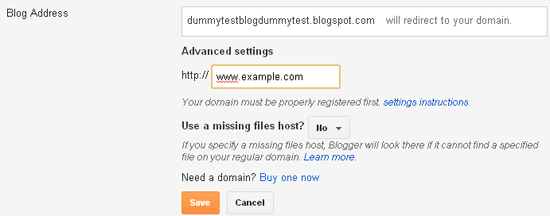
  1. Go to Blogger dashboard > Settings > Basic > Publishing > Blog address
  2. Click on 'Add a custom domain' > 'Switch to Advanced Settings'
  3. Enter your domain name with a 'www' as shown in the screenshot below. Eg- www.example.com
Redirecting Blog to Custom Domain screenshot

Set the 'Use a missing files host?' option to no. Select save and you are done!

Redirecting Naked URL to 'www' URL

Naked URL is the URL that doesn't contain a 'www' in it. Suppose you have registered a domain named example.com and then by following the above method, you set up your blog on that domain. Then there is still one problem left to solve. Because after successfully setting up your blog on custom domain, you can access your blog by the URL: www.example.com but if you enter the URL as just example.com then it would show a 404 error.

There are many users who do not enter the 'www' prefix and so they will not land on your blog, but will land on a 404 error page. To solve this problem, we need to redirect the non-www URL (known as naked URL) to the www URL.

Follow these steps to redirect the naked URL to the correct URL.
  1. Again go to Blogger dashboard > Settings > Basic > Publishing > Blog address
  2. Click on Edit > Check the option 'Redirect yourblog.com to www.yourblog.com'
Click on save. That's it!

Editing Site Links and other Services

After redirecting your blog to custom domain, the internal links within your blog do not change automatically. You need to change them manually.
  1. Check for internal links on any blog post and correct it.
  2. Open you blog's HTML template and search for your old blogspot.com links and manually change them to the new link with the 'www' prefix.
One important service that most of you would be using on your blog is Feedburner. Go to feeds.feedburner.com and edit your feed settings to the new blog address and the new blog's RSS address.

I should also remind you about some other places where possibly you have placed a link to your blog.
  1. Facebook/Twitter/LinkedIn or other social networking sites.
  2. Forum signatures.
  3. Reciprocal link exchanges. You can send an email to the other blog owner to update the link.
You won't be able to edit commentluv comment links on other blogs. But don't worry about it because the old blogspot.com links would be redirected to the new blog's address. Also in a few days, after Google re-indexes your new blog's URL, you will get back all the backlinks even if they link to the old blogspot.com blog.
In this process, you will lose your PR and Alexa rank but you will eventually gain them back without any special efforts.

Image credit: sheelamohan/FreeDigitalPhotos.net

Over to you!

Did the tutorial help you? Or do you have any doubts on this process? I would love to hear from you so do leave a comment.

Saturday, 3 November 2012

Setting up a Custom Domain for Blogger

This is the first part of my 2 section tutorial on setting up a blogger blog on custom domain. In this part I have discussed how to set up A records and CNAME records for the custom domain to use it for your blogspot blog according to the newly updated features and settings by Blogger.

After buying a custom domain for your blog, the next step is to set up CNAME and A records for it. Recently (in October 2012) Blogger had faced some issues regarding mapping a custom domain for its blogspot users and after that, they had introduced a new CNAME record to verify the ownership of domain.

OK. So let us move on to these settings. I have divided the settings in 2 parts. The first part is divided into two parts according to your registrant. That is because in Godaddy, these settings are easier compared to other registrants. The second part deals with the 2nd CNAME record required as per latest update by Blogger.

Part 1: Setting A records and 1st required CNAME record


Option 1: For domains registered through Godaddy:

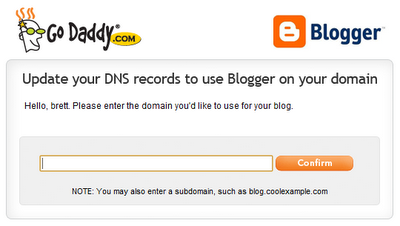
Go to your account domain setting tool and enter the domain name you want to set up for blogger as shown in the figure below. In 10-15 minutes, the account will be half ready for blogger.
Godaddy domain setting tool for Blogger
I said half ready because still there is one more CNAME record remaining to add. Now jump to Part 2.

Option 2: For domains registered through Namecheap, name.com or other registrants:

For other registrants, you will have to manually set up A records and CNAME records.

These are the required A records:
@     216.239.32.21     1800
@     216.239.34.21     1800
@     216.239.36.21     1800
@     216.239.38.21     1800
Here 1800 is the TTL (Time to live)

And this is the 1st CNAME record you need to enter:
www     ghs.google.com

Now move to Part 2 to create the 2nd required CNAME record

Part 2: Setting 2nd required CNAME record

Go to: Blogger Dashboard > Settings > Basic > Blog Address > Add a custom domain

Now click on 'Switch to advanced settings'.

New CNAME Record Settings for Blogger

Enter your domain name with www like www.example.com (as shown above). Now click on settings instructions.

You will be taken to a page of instructions. First select 'On a top-level domain (www.example.com)' option. Now find the second CNAME record details and note it.

CNAME records blogger

Now open your registrant and go to account domain settings and manually enter the 2nd CNAME record as given in the instructions page. Note that in some registrants like Godaddy there is no need to (and you cannot) add the last dot (.) given in the CNAME destination eg "xyzabc.domainverify.googlehosted.com." There is no need to add the last dot so just type "xyzabc.domainverify.googlehosted.com" in the CNAME destination.

Congrats! You have completed the required tasks to set up a custom domain for blogger. Now wait for nearly one hour for the settings to show their results and then move to the next step of setting up blogger on custom domain.

Read the second part of the turorial: How to Redirect Blogspot Blog to Custom Domain